Processor best practices
This guide covers advanced patterns for processors that need to mutate documents or query indexed data. It builds on the concepts from Building a Processor — read that first if you haven't already.
Before reading this guide, make sure you're familiar with the basics:
- Building a Processor — processor interface, factories, and filters
One-way data flow
Processors should follow a one-way data flow: operations flow in via onOperations, and mutations flow out via dispatch.
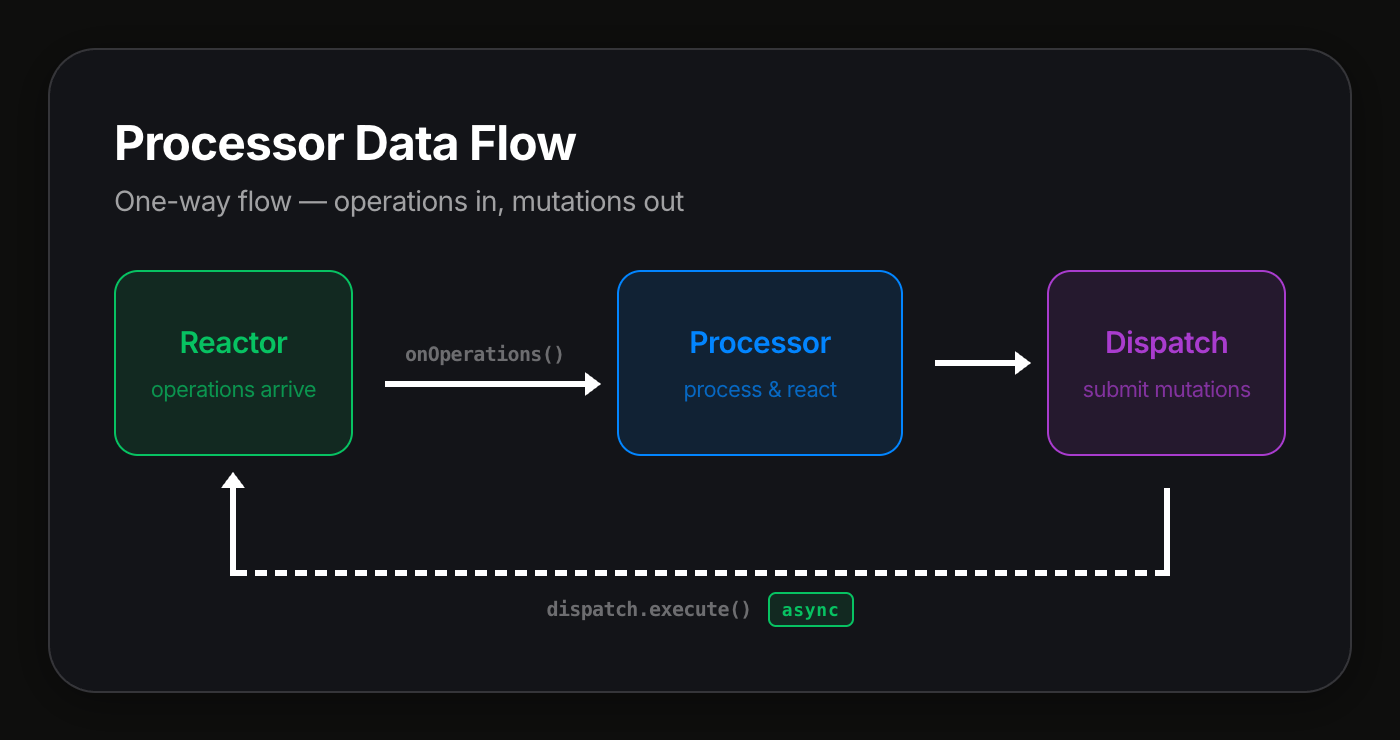
The key principle: never block on a reactor operation from inside a processor. When a processor dispatches actions, the job is submitted asynchronously — the processor does not wait for it to complete. If the processor needs to react to the result, it will receive the resulting operations in a future onOperations call.
This design keeps processors predictable, avoids circular dependencies, and prevents scenarios where a processor waits on work that depends on that same processor finishing.
Ordering across documents
Operations for one document's scope and branch arrive in ordinal order, but operations for different documents do not: document B's creation can reach your processor after document A's operation that refers to B. If you need operations in ordinal order within one call, sort the batch by context.ordinal at the top of onOperations. No ordering is available across calls. If a processor must resolve a reference to another document, look it up in the read model or relational store it already writes to, and handle the case where it is not there yet, rather than relying on the order of arrival.
Erasing deleted documents
A processor that stores data must erase a document's data when the document is deleted. The reactor removes its own records of a deleted or purged document; the rows, series or files your processor wrote stay until your processor removes them. A processor that ignores deletions keeps a purged document's data, and there is no purge callback to catch up later.
- Handle
DELETE_DOCUMENTandPURGE_DOCUMENTalike. Both name the document inoperation.action.input.documentId.PURGE_DOCUMENTis the marker a purge leaves in the operation log; a reactor that missed the deletion receives only the marker. - Include
"document"in the filter'sscope. Both aredocument-scope operations, so a processor filtered to["global"]never sees them. Skip the otherdocument-scope operations yourself. - Handle deletions before reading
resultingState. The marker can arrive with noresultingState. - Make the handler idempotent. A document's marker can arrive after its
DELETE_DOCUMENT, and more than once. - Don't use
onDisconnectfor erasure. It also runs when the factory is unregistered or reloaded.
After a purge, the reactor delivers the purged document's marker and none of its earlier operations. When a drive is deleted, its processors receive the batch up to and including the drive's own deletion, which reaches them whatever their filter, and then onDisconnect.
async onOperations(operations: OperationWithContext[]): Promise<void> {
  for (const { operation, context } of operations) {
    const type = operation.action.type;
    if (type === "DELETE_DOCUMENT" || type === "PURGE_DOCUMENT") {
      const input = operation.action.input as { documentId?: string };
      await this.store.deleteDocument(input.documentId ?? context.documentId);
      continue;
    }
    if (context.scope !== "global") continue;
    // ...index the operation
  }
}
For relational processors, RelationalDbProcessor has deleteDocumentRows, isNamespaceDrive and dropNamespace (see Erase a deleted document). An analytics processor that writes a document's series under ph/doc/<documentId>/... clears them with analyticsStore.clearSeriesBySource(AnalyticsPath.fromString(`ph/doc/${documentId}`), true). The generated relational and analytics processors include this handling.
Dispatching actions with dispatch
The dispatch API lets a processor mutate documents by executing actions. It is available on the IProcessorHostModule object passed to your factory.
import type { Action, PHDocument } from "document-model";

interface IProcessorDispatch {
  execute(
    docId: string,
    branch: string,
    actions: Action[],
    signal?: AbortSignal,
    meta?: Record<string, unknown>,
  ): Promise<ProcessorDispatchResult>;
  createInDrive(
    driveId: string,
    document: PHDocument,
    parentFolder?: string,
    signal?: AbortSignal,
  ): Promise<ProcessorDispatchResult & { documentId: string }>;
  deleteDocument(
    docId: string,
    propagate?: "none" | "cascade",
    signal?: AbortSignal,
  ): Promise<ProcessorDispatchResult>;
}

type ProcessorDispatchResult = {
  id: string; // Job ID
  status: string; // Job status at time of submission
};
dispatch.execute() submits the job to the reactor and returns as soon as it is accepted, with the job's id and status. The processor does not wait for the job to complete. createInDrive adds a document to a drive; the document's own creation has completed when it resolves, and the drive's file node has been accepted. deleteDocument deletes a document, and with "cascade" its orphaned children.
Accessing dispatch in a factory
Capture module.dispatch in your factory and pass it to your processor:
import type {
  IProcessor,
  IProcessorDispatch,
  IProcessorHostModule,
  ProcessorRecord,
  ProcessorFilter,
} from "@powerhousedao/reactor-browser";
import type { PHDocumentHeader } from "document-model";

export const myProcessorFactory =
  (module: IProcessorHostModule) =>
  async (driveHeader: PHDocumentHeader): Promise<ProcessorRecord[]> => {
    const processor = new MyProcessor(module.dispatch);

    const filter: ProcessorFilter = {
      branch: ["main"],
      documentId: ["*"],
      documentType: ["powerhouse/invoice"],
      scope: ["global"],
    };

    return [{ processor, filter }];
  };
Example: cross-document automation
A processor that watches for approved invoices and dispatches a payment action to a separate document:
import type {
  IProcessor,
  IProcessorDispatch,
} from "@powerhousedao/reactor-browser";
import type { OperationWithContext } from "document-model";

export class InvoiceApprovalProcessor implements IProcessor {
  constructor(
    private dispatch: IProcessorDispatch,
    private paymentDocId: string,
  ) {}

  async onOperations(operations: OperationWithContext[]): Promise<void> {
    for (const { operation, context } of operations) {
      if (
        operation.action.type === "SET_STATUS" &&
        operation.action.input?.status === "approved"
      ) {
        await this.dispatch.execute(this.paymentDocId, "main", [
          {
            type: "CREATE_PAYMENT",
            input: {
              invoiceId: context.documentId,
              amount: operation.action.input.amount,
            },
            scope: "global",
          },
        ]);
      }
    }
  }

  async onDisconnect(): Promise<void> {}
}
The processor dispatches the CREATE_PAYMENT action and moves on. It does not wait for the payment document to be updated. If the processor needs to know the payment was created, it can subscribe to powerhouse/payment operations via its filter.
Parameter reference
| Parameter | Type | Required | Description |
|---|---|---|---|
docId | string | Yes | Target document ID |
branch | string | Yes | Branch to apply actions to (usually "main") |
actions | Action[] | Yes | Actions to dispatch |
signal | AbortSignal | No | Cancellation signal |
meta | Record<string, unknown> | No | Additional metadata for the job |
Why not wait for the write?
A processor writes through dispatch and reads through module.read. Do not wait for a write to reach READ_READY (or read the written document back) from inside a processor.
Why:
-
Potential blocking.
READ_READYwaits on processors to finish their current batch — including the very processor making the call. -
Unnecessary round-trip. The processor will receive the resulting operations through
onOperationsanyway. Waiting for the result synchronously adds latency without benefit. -
One-way flow. Processors should be written with a one-way data flow: react to operations, dispatch new work, and move on. If you need the result of a dispatch, handle it in a future
onOperationscall — don't block waiting for it.
Instead of:
// Bad: blocks until the job is READ_READY
const result = await this.dispatch.execute(docId, "main", actions);
await module.read.waitForJob(result.id); // module: the host module
Use:
// Good: submits and returns immediately
await this.dispatch.execute(docId, "main", actions);
Querying data with getReadModel
The getReadModel API lets a processor look up a registered read model by name. Read models are materialized views maintained by the reactor — they are updated as operations are written and provide efficient query access to indexed data.
getReadModel<T>(name: string): T
Pass the read model's name property and cast to the expected type. Throws an error if the read model is not found.
Default read models
The reactor registers several built-in read models that processors can access:
| Name | Type | Description |
|---|---|---|
"document-view" | IDocumentView | Maintains document snapshots for reads; provides get(), find(), and consistency tracking |
"document-indexer" | IDocumentIndexer | Tracks document relationships (parent/child) and metadata |
"processor-manager" | IProcessorManager | Routes operations to registered processors |
"subscription-notification" | SubscriptionNotificationReadModel | Notifies subscription callbacks when documents change |
For example, to look up a document snapshot from inside a processor:
import type { IDocumentView } from "@powerhousedao/reactor";

const documentView = module.getReadModel<IDocumentView>("document-view");
Custom read models registered via IReadModelCoordinator are also available by their name property.
Example: querying indexed data
A processor that checks a budget read model before dispatching a payment:
import type {
  IProcessor,
  IProcessorDispatch,
} from "@powerhousedao/reactor-browser";
import type { OperationWithContext } from "document-model";

interface IBudgetReadModel {
  getRemainingBudget(departmentId: string): Promise<number>;
}

export class BudgetCheckProcessor implements IProcessor {
  constructor(
    private dispatch: IProcessorDispatch,
    private budgetModel: IBudgetReadModel,
  ) {}

  async onOperations(operations: OperationWithContext[]): Promise<void> {
    for (const { operation, context } of operations) {
      if (operation.action.type !== "REQUEST_PAYMENT") continue;

      const { departmentId, amount } = operation.action.input;
      const remaining = await this.budgetModel.getRemainingBudget(departmentId);

      if (remaining >= amount) {
        await this.dispatch.execute(context.documentId, "main", [
          {
            type: "APPROVE_PAYMENT",
            input: { departmentId, amount },
            scope: "global",
          },
        ]);
      }
    }
  }

  async onDisconnect(): Promise<void> {}
}
The factory wires the read model:
export const budgetCheckProcessorFactory =
  (module: IProcessorHostModule) =>
  async (driveHeader: PHDocumentHeader): Promise<ProcessorRecord[]> => {
    const budgetModel = module.getReadModel<IBudgetReadModel>("budget");

    const processor = new BudgetCheckProcessor(module.dispatch, budgetModel);

    return [
      {
        processor,
        filter: {
          branch: ["main"],
          documentId: ["*"],
          documentType: ["powerhouse/expense-report"],
          scope: ["global"],
        },
      },
    ];
  };
getReadModel throws if the read model is not registered. Ensure the read model is registered with the reactor before your processor factory runs. If the read model is optional, wrap the call in a try/catch in your factory and handle the missing case gracefully.
IProcessorHostModule reference
The IProcessorHostModule is passed to your factory's outer function and provides access to all processor APIs:
interface IProcessorHostModule {
  analyticsStore: IAnalyticsStore;
  relationalDb: IRelationalDb;
  processorApp: ProcessorApp;
  dispatch: IProcessorDispatch;
  getReadModel<T>(name: string): T;
  config?: Map<string, unknown>;
}
| Field | Type | Description |
|---|---|---|
analyticsStore | IAnalyticsStore | Time-series analytics store for writing metrics |
relationalDb | IRelationalDb | Relational database for creating namespaced stores |
processorApp | ProcessorApp | The host application ("connect" or "switchboard") |
dispatch | IProcessorDispatch | Fire-and-forget action dispatch (see above) |
getReadModel | <T>(name: string) => T | Read model lookup by name (see above) |
config | Map<string, unknown> | Optional processor-specific configuration |
@powerhousedao/reactor-browser re-exports these types for convenience in browser environments. If you are working outside the browser (Node.js, CLI tools, server-side code), import directly from @powerhousedao/reactor or @powerhousedao/shared.
Summary
- Use
dispatch.execute()to mutate documents from processors — neverreactorClientdirectly - Use
getReadModel()to query indexed data for lookups and validation - Design for one-way data flow: operations in via
onOperations, mutations out viadispatch - Never block on reactor operations that might circle back to the processor pipeline
- React asynchronously: if you need the result of a dispatch, handle it in a future
onOperationscall - Access all APIs through
IProcessorHostModulein your factory function - Erase at deletion: delete a document's data on
DELETE_DOCUMENTandPURGE_DOCUMENT
Related pages
- Building a Processor — processor basics
- Relational Database Processor — database-backed processors
- Processor Migration Guide — migrating from the legacy strand-based API